
3 signals
routing by amount, cost center and project
Onivo AP · Solutions
The invoice arrives, the lines get coded, the match runs — and then somebody has to say yes. Onivo routes that decision by amount, cost center and project, puts everything the approver needs on one screen, and writes every step into a tamper-evident audit trail. For the design thinking behind it, read the guide to AP approval workflows that scale.
routing by amount, cost center and project
duplicates and reissues caught first
recorded in a tamper-evident trail
Small invoices take a short path. Larger ones climb to more senior approvers. You set the thresholds.
Routing follows where the spend lands, so the person who owns that budget is the one who signs off.
An invoice that needs a human check is assigned to a reviewer before any approval starts.
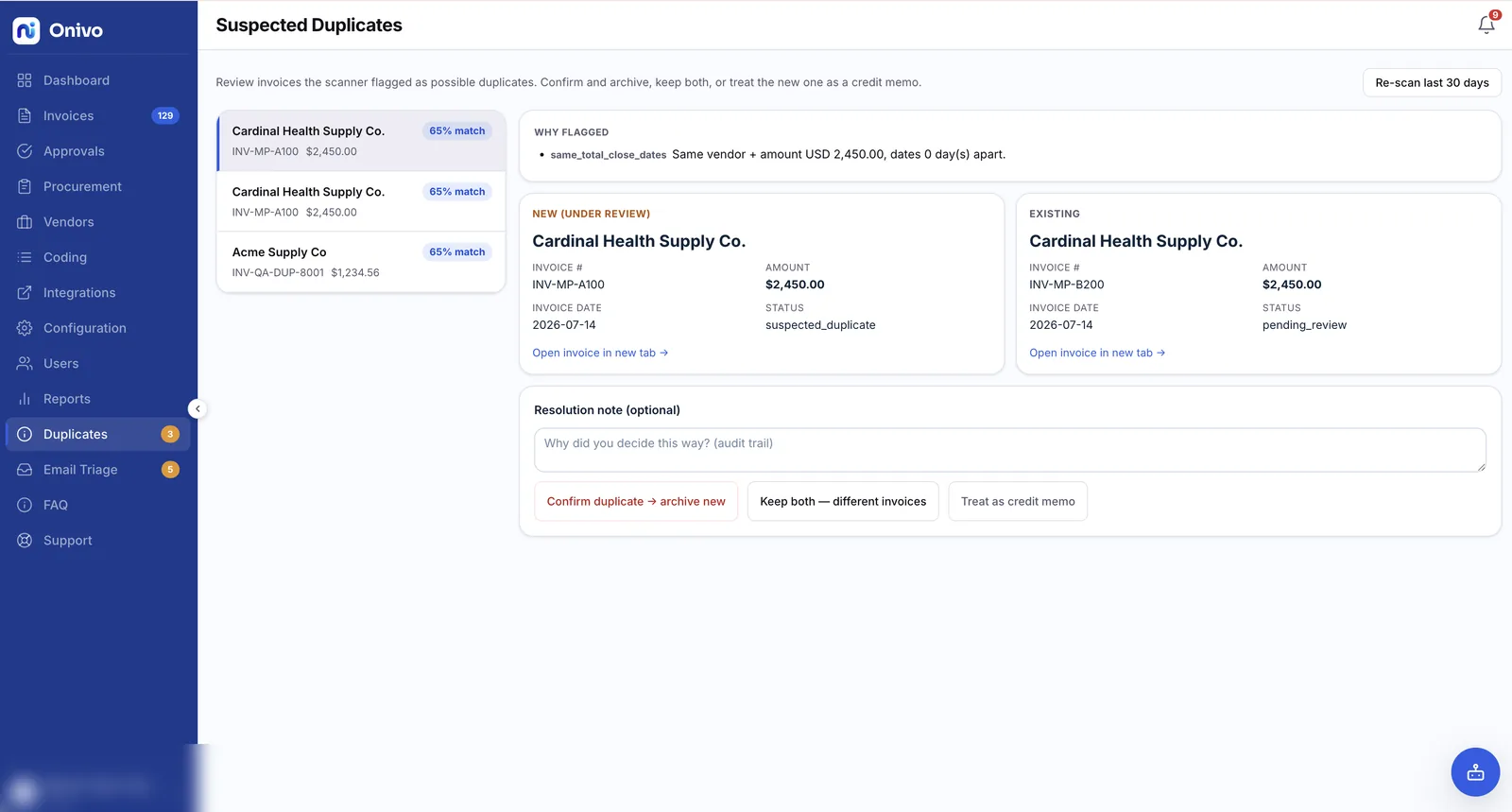
Duplicate and reissued invoices are flagged before they can be paid twice.
Routing
Most approval tools route by one number: the invoice total. Onivo reads three things — the amount, the cost center and the project — because that is how spending authority actually works. See how Onivo compares to other AP tools and to running AP in your accounting system alone.
Before routing starts, every line on the invoice is coded to a GL account, cost center and project — the same coding produced during invoice capture and OCR. The rules read that coding, not a guess about the vendor.
You define who approves at which amounts, and who owns each cost center and project. Onivo applies those rules to the coded lines and builds the chain — one approver for routine spend, more for the invoices that deserve more eyes.
An invoice with a low-confidence field or an unmatched line is assigned to a reviewer before approval begins. Their corrections feed the learning layer, so the next invoice from that vendor reads cleaner on its own.
Each approver sees the invoice when it is their turn — no forwarding, no chasing. Approve or reject; either way the decision is recorded with who acted and when.
The approver's view
Approvals stall when the approver has to go digging — opening the PO in one system, the invoice in another, and email for the rest. Onivo puts the whole story on one screen:
That is the whole decision, in one place. The approver spends their attention on whether the spend is right — not on reassembling the paperwork.
Duplicate defense
The expensive mistake in AP is not a slow approval — it is paying the same invoice twice. And duplicates rarely look identical: the same PDF arrives once by email and once by upload, or a vendor reissues an invoice under a new number after a dispute. Onivo screens every incoming invoice against what is already in the system and flags duplicates and reissued invoices before either reaches payment — while the approval is still open, when stopping it costs nothing.
The same caution continues into the books. When an approved invoice syncs to your ERP through the ERP connector, Onivo queries before it creates, so a bill that already exists in your ledger is never posted a second time.
Accountability
Every decision in the approval workflow — an approval, a rejection, a reassignment, a corrected field — is written to a tamper-evident audit trail: who acted, what they acted on, and when. Months later, when an auditor asks why an invoice was paid, the answer is a record, not a reconstruction from inboxes. How the trail is protected, along with the rest of our controls, is covered on the security page.
FAQ
Yes. Onivo routes approvals by amount, cost center and project. Because every line is coded before routing starts, an invoice can go to the person who owns the budget it actually hits, not just to whoever handles that vendor.
The original invoice, every line with its GL account, cost center and project, the result of the match against the purchase order and goods receipt, and any duplicate warning — all on one screen. Fields Onivo could not read are left blank rather than guessed.
Onivo screens each incoming invoice against what is already in the system and flags reissued invoices as well as straight duplicates, before either one is paid twice. On the ERP side, query-before-create means a bill that already exists is never posted a second time.
Yes. Every approval, rejection, reassignment and corrected field is written to a tamper-evident audit trail — who acted and when — so the history can be verified after the fact.
Bring your current approval model — who signs off, at what amounts, for which cost centers and projects — and we will show it running in Onivo on real invoices.
Pricing is sized to invoice volume, and the security page covers how your invoice data is protected.