
Three documents
The invoice, the purchase order, the goods receipt — compared line against line.
Onivo · Solutions
Onivo compares the invoice, the purchase order, and the goods receipt line by line, within price, quantity, and amount tolerances you set. A clean match moves on. A mismatch becomes an exception and waits for a person. New to the control itself? Start with the plain-language guide to what 3-way matching actually checks.
The invoice, the purchase order, the goods receipt — compared line against line.
Price, quantity, and amount thresholds your team sets, not defaults you inherit.
A failed check holds the invoice from approval until someone resolves it.
Service invoices with no receipt match against the purchase order alone.
What gets compared
What the vendor says you owe. Onivo reads it straight from the PDF or emailed attachment through invoice capture and OCR — invoice number, dates, totals, and every line item. If a field can't be read with confidence, it stays blank rather than getting a guess.
What you agreed to buy: the items, the quantities, and the unit prices someone signed off on before the order went out. The PO is the money side of the agreement, which is why it anchors both 2-way and 3-way matches.
What actually arrived — the quantities counted at the dock or confirmed by the person who ordered. The receipt carries no prices; its job in the match is to answer one question: did we get what we're being billed for?
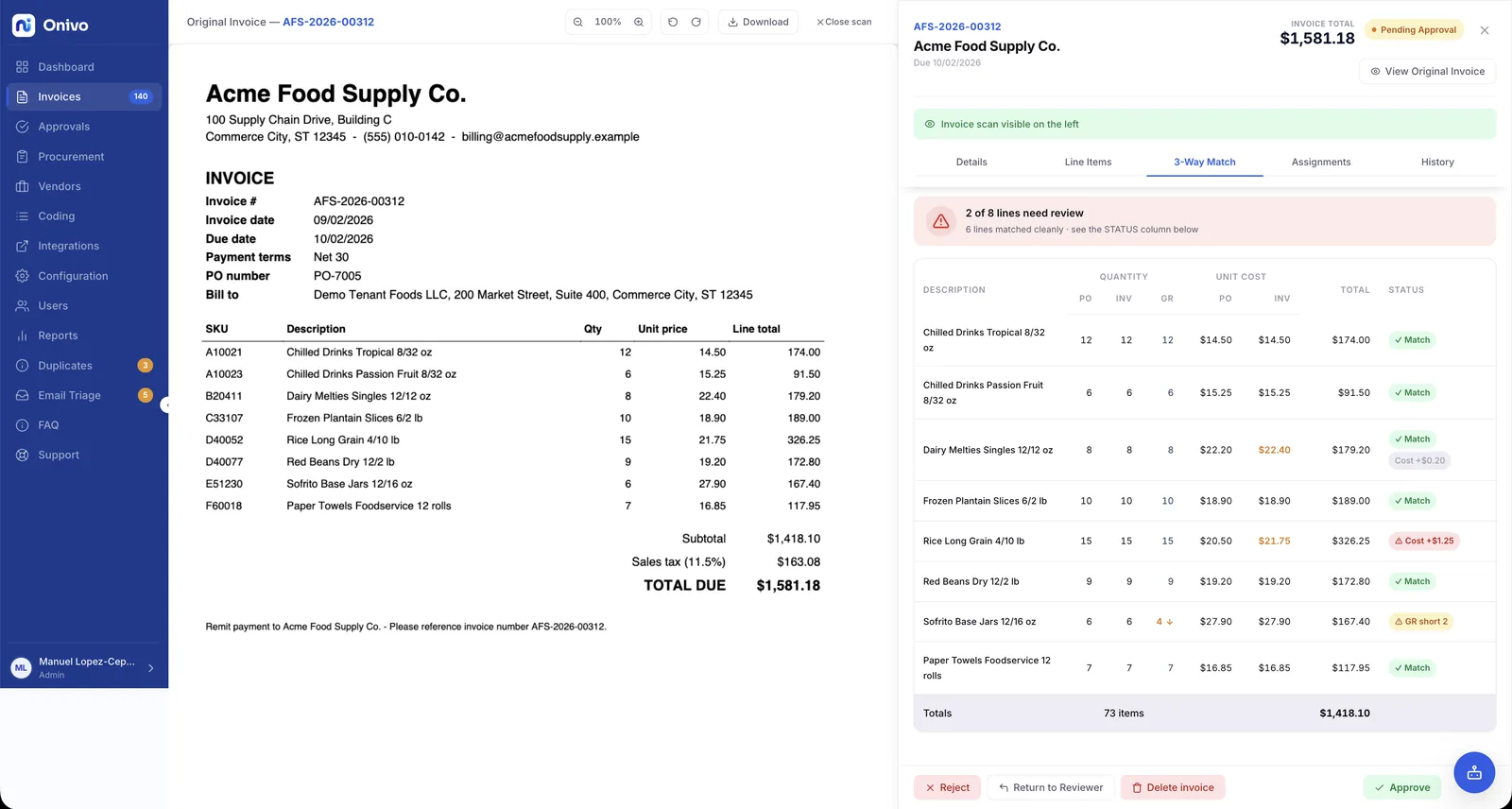
The match runs line by line, not total against total. Each invoice line is paired with its purchase order line, then checked: is the unit price what the PO says, is the quantity billed covered by what was received, does the line amount land inside tolerance. A total-level check would let two offsetting errors cancel out and sail through. Line-level matching doesn't.
Tolerances
Real invoices rarely agree with the PO to the cent. A unit price rounds differently, freight gets allocated across lines, a vendor's system truncates where yours rounds. A match that demands exact agreement fails on invoices no one at a desk would question — and then the exception queue becomes the place where every invoice lives. So the thresholds belong to you, not to us:
Inside the tolerances, the line passes and nobody is interrupted. Outside them, the line fails — visibly, with the two numbers that disagree side by side.
Match failures
A line that fails a check becomes an exception, and the invoice is held from approval. It does not enter approval routing by amount, cost center, and project until the exception is resolved — so an approver never signs off on an invoice with an open discrepancy buried in line 4. The hold is the point: the mismatch waits for a person instead of riding through on momentum.
Alongside the match, Onivo catches duplicate and reissued invoices before they are paid twice — the second copy of an invoice is a mismatch of its own kind, and it gets the same treatment: surfaced, held, decided by a person. Every one of those decisions is recorded in a tamper-evident audit trail, so when the auditor asks why an invoice was paid, the answer is a record, not a recollection.
Once the match passes and approvals finish, the invoice syncs to your books through the ERP connection — with query-before-create, so nothing posts twice.
Line-level matching is where AP tools differ most — see how Onivo compares to other AP tools and to running AP in your accounting system alone.
2-way matching
Not every purchase produces a goods receipt. The retainer, the software subscription, the monthly service contract — nothing arrives at a dock, so there is nothing to receive. For those, a 2-way match is the honest check: the invoice against the purchase order, same line pairing, same price and amount tolerances.
The reason it's those two documents and not some other pair comes down to where the money lives. The invoice and the purchase order both carry prices; the goods receipt carries quantities. A 2-way match compares the two documents that state amounts — what was billed against what was agreed. The receipt, when it exists, adds the third question a 3-way match answers: whether the thing being billed for ever showed up. Onivo runs both, so the desk that buys servers and the desk that buys consulting hours each get the match that fits.
FAQ
3-way matching compares three documents before an invoice is approved for payment: the invoice (what the vendor billed), the purchase order (what was agreed), and the goods receipt (what arrived). Onivo runs the comparison line by line, within tolerances you set.
The failed check becomes an exception and the invoice is held from approval. It does not move into approval routing until someone resolves the exception, and every decision along the way is recorded in a tamper-evident audit trail.
You do. Price, quantity, and amount tolerances are set by your team, so the match reflects what your controller would actually question at a desk — not a vendor's default.
Then a 2-way match is the right check. Services, subscriptions, and licenses produce no receipt, so Onivo compares the invoice against the purchase order only — same line pairing, same price and amount tolerances.
Bring a purchase order, its receipt, and the invoice that followed. We'll run the match in front of you and show you exactly where each line lands.
Pricing is sized to invoice volume, and the security page covers how your invoice data is protected.